> ## Documentation Index
> Fetch the complete documentation index at: https://docs.lettherebe.app/llms.txt
> Use this file to discover all available pages before exploring further.
# Backgrounds
> Register a location once in LTB and get four auto-generated camera angles, keeping the environment consistent across every shot, scene, and cut.
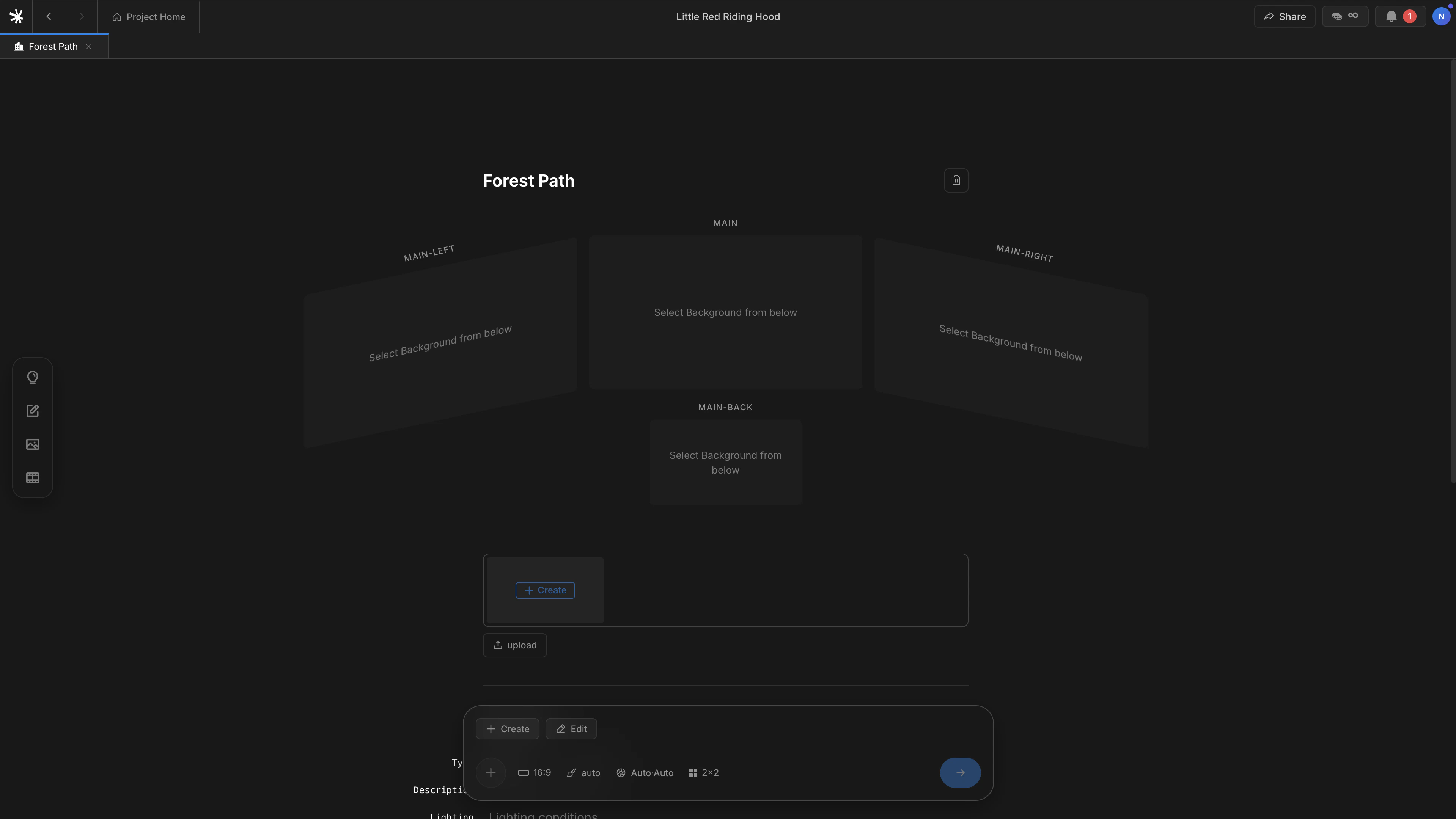
A Background is a location — a forest path, a kitchen, a car interior. When you register one, LTB generates **four camera angles** from a single description. Cuts inside the same scene can shift camera direction without the environment drifting.
 ## How to register
Backgrounds register through the slash menu, not the `@` autocomplete.
Press `/` on an empty line in the Scenario editor.
Select `Background` from the menu. A block appears on the line.
Type the location name — for example, `Forest path` or `Inside the car` — and press enter.
The Background detail page opens, and the four camera angles begin generating in parallel.
## The four views
LTB names the four angles by camera direction relative to the main shot.
| View | Camera direction |
| -------------- | ---------------------------------- |
| **MAIN** | The defining angle of the location |
| **MAIN-LEFT** | 90 degrees left of MAIN |
| **MAIN-RIGHT** | 90 degrees right of MAIN |
| **MAIN-BACK** | 180 degrees reversed — facing away |
Each beat in the scene picks the angle that fits its blocking. Cuts inside the same Background draw from the same four views, so geometry and lighting stay continuous.
Backgrounds also divide scenes. A new `Background` block starts a new scene number. Beats within the same Background share one scene. See [Scenario](/workflows/scenario#backgrounds-divide-scenes) for the scene-break rule.
## Backgrounds versus Characters and Subjects
| | Character | Subject | Background |
| -------------- | -------------------- | ----------------- | ------------------ |
| **What** | A person | A prop | A place |
| **Enters via** | `@` autocomplete | `@` autocomplete | `/` slash menu |
| **Input** | 1–3 reference photos | 1 reference photo | One location name |
| **Output** | Locked identity | Locked shape | Four camera angles |
## Next
How Backgrounds split scenes inside the editor.
How Backgrounds flow into generated shots.
## How to register
Backgrounds register through the slash menu, not the `@` autocomplete.
Press `/` on an empty line in the Scenario editor.
Select `Background` from the menu. A block appears on the line.
Type the location name — for example, `Forest path` or `Inside the car` — and press enter.
The Background detail page opens, and the four camera angles begin generating in parallel.
## The four views
LTB names the four angles by camera direction relative to the main shot.
| View | Camera direction |
| -------------- | ---------------------------------- |
| **MAIN** | The defining angle of the location |
| **MAIN-LEFT** | 90 degrees left of MAIN |
| **MAIN-RIGHT** | 90 degrees right of MAIN |
| **MAIN-BACK** | 180 degrees reversed — facing away |
Each beat in the scene picks the angle that fits its blocking. Cuts inside the same Background draw from the same four views, so geometry and lighting stay continuous.
Backgrounds also divide scenes. A new `Background` block starts a new scene number. Beats within the same Background share one scene. See [Scenario](/workflows/scenario#backgrounds-divide-scenes) for the scene-break rule.
## Backgrounds versus Characters and Subjects
| | Character | Subject | Background |
| -------------- | -------------------- | ----------------- | ------------------ |
| **What** | A person | A prop | A place |
| **Enters via** | `@` autocomplete | `@` autocomplete | `/` slash menu |
| **Input** | 1–3 reference photos | 1 reference photo | One location name |
| **Output** | Locked identity | Locked shape | Four camera angles |
## Next
How Backgrounds split scenes inside the editor.
How Backgrounds flow into generated shots.